/>

How AI Call Screening Works: A Complete Guide

By OsmO AI Team 12 min read
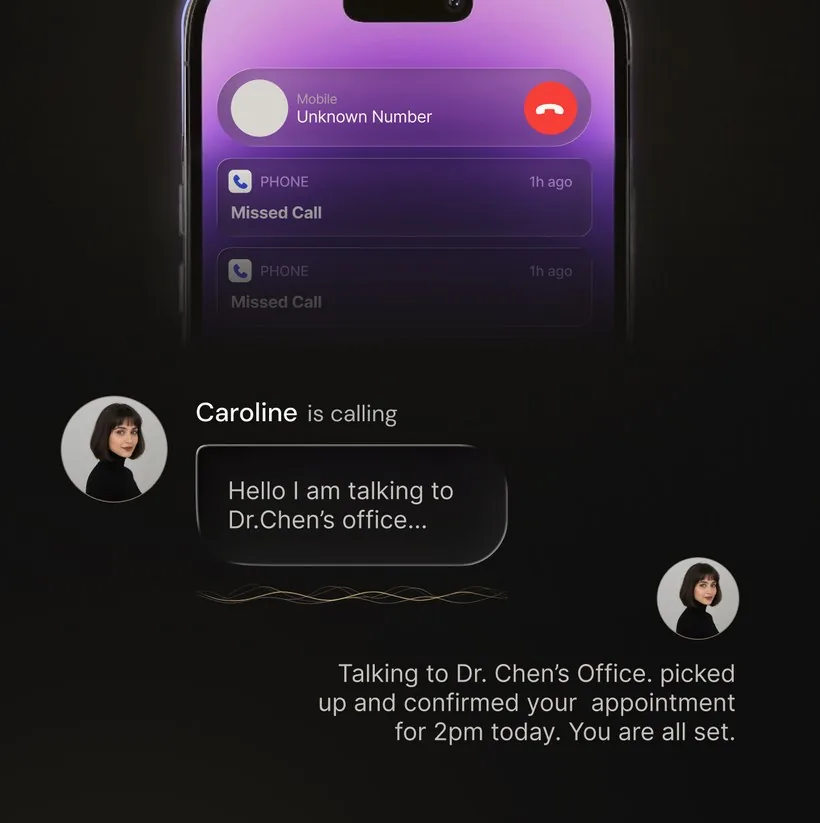
An OsmO call transcript showing how AI call screening works

Every day, billions of phone calls are placed worldwide. A significant and growing portion of them are spam, scams, or robocalls. Traditional defenses like caller ID and blocklists were designed for a simpler era when a bad number stayed bad. Today, scammers rotate through thousands of phone numbers daily, spoof local area codes, and use increasingly sophisticated social engineering. The old tools are not keeping up.

AI call screening represents a fundamentally different approach to this problem. Instead of trying to predict whether a phone number is dangerous, AI call screening answers the call and evaluates the actual human (or robot) on the other end. This guide covers everything you need to know: how the technology works under the hood, the different types of screening available, how to set it up on your own phone, and what to look for when choosing a solution.

What Is AI Call Screening?

AI call screening is a technology that uses artificial intelligence to answer incoming phone calls on your behalf, engage the caller in conversation, determine whether the call is legitimate or spam, and report back to you with a summary. The key distinction from traditional call blocking is that AI screening does not reject calls — it handles them. Every unknown caller gets answered, questioned, and evaluated so you never have to wonder whether you missed something important.

At its core, AI call screening acts as a personal receptionist that sits between you and the outside world. It answers when you cannot or choose not to, has a conversation with whoever is calling, and gives you the information you need to decide what to do next.

Key distinction: Call blocking rejects calls from known bad numbers. Call screening answers all unknown calls and evaluates them in real time. Blocking guesses based on a number. Screening knows based on the conversation.

The Technology Behind AI Call Screening

AI call screening combines several layers of technology working together in real time. Understanding these layers helps explain why AI screening is so much more effective than traditional approaches.

Speech recognition (speech-to-text)

The first step is understanding what the caller is saying. Modern speech recognition systems convert spoken language into text with high accuracy, even with background noise, accents, and varied speaking speeds. This transcription happens in real time — typically within milliseconds of the words being spoken — so the AI can process and respond without noticeable delays.

Natural language processing (NLP)

Once the caller's words are transcribed, natural language processing analyzes the meaning and intent behind them. NLP does not just read words — it understands context. It can tell the difference between "I am calling about your car's extended warranty" (a well-known scam script) and "I am calling from Dr. Patel's office about your appointment tomorrow" (a legitimate call). The AI evaluates sentence structure, vocabulary patterns, emotional tone, and conversational flow to classify the caller's intent.

Intent classification

Based on the NLP analysis, the AI classifies the call into categories: spam, scam, telemarketing, legitimate personal, legitimate business, delivery notification, appointment confirmation, and so on. This classification determines how the AI responds and how it prioritizes the notification it sends to you. A call classified as a potential scam might be ended quickly with a summary, while a call from a legitimate business gets a more detailed exchange and a high-priority alert.

Conversational AI (response generation)

The AI does not just listen — it talks back. Using text-to-speech technology and conversational models, the AI generates natural-sounding responses in real time. It can ask follow-up questions ("Can I get your name and a callback number?"), provide information ("They are not available right now, can I take a message?"), and adapt its responses based on what the caller says. Modern AI voices are natural enough that most callers do not realize they are speaking with a machine.

Continuous learning

AI call screening systems improve over time. As the system handles more calls, it encounters new spam patterns, new scam scripts, and new legitimate call scenarios. This data feeds back into the model, making it better at distinguishing good calls from bad ones. Unlike a static blocklist that only knows about numbers that have already been reported, AI screening gets smarter with every call it processes.

Types of AI Call Screening

Not all AI call screening works the same way. There are three main categories, each with different capabilities and limitations:

1. Carrier-level screening

Some mobile carriers offer AI-powered screening as part of their service. Calls are analyzed at the network level before they reach your phone. The carrier identifies likely spam based on call patterns, known spam databases, and network-level signals like call volume from a single number. The main advantage is that it requires no app installation. The disadvantage is that it is typically limited to flagging or blocking, not answering and screening.

2. Device-level screening

Phone manufacturers like Google have built AI screening directly into their devices. Google Call Screen on Pixel phones is the most prominent example. When a call comes in, you can ask the built-in AI to answer and ask the caller to identify themselves. The AI provides a real-time transcript so you can decide whether to pick up. Device-level screening is convenient but is typically locked to specific hardware.

3. App-level screening

Third-party apps like OsmO provide AI call screening that works on any phone, regardless of manufacturer or carrier. These apps use call forwarding to route unanswered calls to an AI assistant that handles the conversation. App-level screening typically offers the most features — including outbound AI calls, custom instructions, recordings, and integrations — because the developer controls the entire experience.

Type How It Works Pros Cons
Carrier-level Network analyzes calls before delivery No setup required; works on all phones Limited to flagging/blocking; no conversation
Device-level Built into phone OS (e.g., Pixel) Seamless integration; no extra app Hardware-locked; limited customization
App-level Call forwarding to AI assistant Works on any phone; most features; highly customizable Requires app install and subscription

How AI Call Screening Works Step by Step

Here is the typical flow when an AI call screening app like OsmO handles an incoming call:

  1. An unknown call comes in. Your phone rings from a number that is not in your contacts. You are busy, do not recognize the number, or simply choose not to answer.
  2. Call forwarding activates. After a set number of rings (or immediately if you decline), the call is forwarded to your AI assistant. This happens through standard call forwarding, the same mechanism phones have used for decades — no special software or carrier integration is needed.
  3. The AI answers. Your AI assistant picks up the call with a natural-sounding greeting. It introduces itself using the name you have configured and asks the caller for their name and reason for calling.
  4. A real conversation takes place. Unlike a voicemail prompt, the AI engages in a genuine back-and-forth conversation. It responds to what the caller says, asks clarifying questions, and adapts its behavior based on the context. If the caller is leaving a message, the AI acknowledges it. If the caller asks a question, the AI can provide basic answers based on your custom instructions.
  5. The AI evaluates intent. While the conversation is happening, the AI is continuously analyzing the caller's words, tone, and patterns. It classifies the call as spam, scam, legitimate, or uncertain, and adjusts its behavior accordingly.
  6. You receive a notification. On your phone, you get a push notification with the caller's name, their stated reason for calling, and the AI's assessment. You can read the full transcript, listen to the recording, and decide whether to call back — all without having answered the original call.
  7. Your history builds over time. Every screened call is logged in the app with its transcript, recording, and classification. Over time, this creates a searchable record of every caller who tried to reach you, giving you complete visibility into your phone communication.

AI Call Screening vs. Traditional Call Blocking

Understanding the difference between screening and blocking is essential for choosing the right protection for your phone:

Aspect Traditional Blocking AI Call Screening
How it works Rejects calls from a database of known spam numbers Answers calls and evaluates the caller through conversation
New spam numbers Get through until reported and added to the blocklist Caught immediately based on conversational patterns
Spoofed numbers Usually bypass blocking since the displayed number looks legitimate Caught because the AI evaluates what the caller says, not just their number
Legitimate unknown callers May be incorrectly blocked (false positives) Answered, screened, and reported to you with details
Information captured None — the call is simply rejected Caller name, reason, transcript, and audio recording
Missed call risk High for unknown but legitimate callers Near zero — every call is answered and summarized

The fundamental problem with blocking: A blocklist is reactive. It can only stop numbers that have already been flagged. With scammers cycling through thousands of numbers per week and using spoofing to disguise their real identity, a reactive approach will always be behind. AI screening is proactive — it evaluates every caller regardless of their number.

What to Look for in an AI Call Screening App

If you are evaluating AI call screening solutions, here are the features that separate a good product from a great one:

Setting Up AI Call Screening on Your Phone

Getting started with AI call screening is straightforward. Using OsmO as an example, here is what the process looks like:

  1. Install the app. Download OsmO from the Google Play Store or the App Store. The app is free to install; Apple and Google show current plan prices and any available introductory offer before purchase.
  2. Create your account. Sign up with your phone number. OsmO verifies your number with a one-time code.
  3. Configure your AI assistant. Choose a name and voice for your assistant. This is the personality callers will interact with, so pick something that represents how you want your phone to be answered.
  4. Enable call forwarding. OsmO guides you through activating conditional call forwarding on your phone. This typically involves dialing a short code (like *67*[number]#) and takes about 30 seconds. Once enabled, calls you do not answer are automatically routed to your AI.
  5. Customize your instructions (optional). Set up rules for incoming calls, such as "I am expecting a call from a plumber this week — get their arrival time" or "Tell promotional callers I am not interested."
  6. You are protected. From this point on, every unanswered call is handled by your AI. You receive notifications with caller details and can review your full call history at any time.

The entire setup takes under five minutes and does not require any technical knowledge.

Common Scenarios Where AI Screening Helps

To illustrate the practical value, here are real scenarios where AI call screening makes a meaningful difference:

The missed doctor's call

You are in a meeting when your phone buzzes with an unknown number. With call blocking, you might ignore it or it might be silently rejected. With AI screening, OsmO answers, learns it is your doctor's office calling about test results, and sends you a notification with the caller's name, callback number, and the specific reason for the call. You call back during your next break with full context.

The sophisticated scam call

A scammer calls from a local number, spoofed to look like it is from your area. A blocklist has never seen this number before, so it gets through. But when OsmO's AI answers and asks the caller to explain why they are calling, the scammer either hangs up (they are targeting people who answer, not AI) or delivers a scripted pitch that the AI immediately classifies as suspicious. You get a notification flagging the call as a likely scam and never have to interact with it.

The delivery notification

A delivery driver calls to confirm your address. You are driving and cannot answer. Your AI picks up, confirms your availability, and asks the driver to leave the package at the door. You get a transcript of the entire exchange and your package arrives as expected.

The hold queue

You need to call your insurance company but the average hold time is 40 minutes. With OsmO's outbound AI calling, you ask the AI to make the call and wait on hold for you. When a human agent picks up, OsmO notifies you so you can take over the conversation at the right moment.

The Future of AI Call Screening

AI call screening is still a relatively young technology, and it is evolving rapidly. Several trends are shaping where it goes next:

Frequently Asked Questions

Does AI call screening work on all phone carriers?

App-based AI call screening like OsmO works on any carrier because it uses standard call forwarding, which is supported by all mobile carriers worldwide. Device-level screening (like Google Call Screen) depends on the phone manufacturer and may have carrier restrictions.

Can callers tell they are speaking to AI?

Modern AI call screeners use natural-sounding voices and conversational patterns that are very difficult to distinguish from a human assistant. Most callers do not realize they are speaking with AI. The quality of AI voice synthesis has improved dramatically in recent years and continues to get more natural.

Will AI call screening block important calls?

No. This is one of the most important advantages of screening over blocking. AI call screening answers every unknown call rather than rejecting it. The AI talks to the caller, captures their name and reason for calling, and sends you a notification with all the details. You can always call back if the call turns out to be important. Nothing is lost.

For a known person you want to handle without any AI pickup, use OsmO's VIP List. It matches the saved phone number and keeps that call out of the assistant conversation, recording, transcript, and summary flow.

Is AI call screening legal?

Yes. AI call screening is legal in all US states and most countries. Call recording laws vary by jurisdiction — some require one-party consent while others require all-party consent. Check your local laws regarding call recording. Note that AI screening itself (answering and conversing) is universally permitted; the recording aspect is what varies by location.

How is AI call screening different from call blocking?

Call blocking silently rejects calls from known spam numbers and provides no information about the caller. AI call screening answers unknown calls, engages the caller in conversation, determines their intent, and provides you with a detailed summary including their name, reason for calling, a full transcript, and often an audio recording. Screening captures information; blocking discards it.

Getting Started

AI call screening is one of those technologies that, once you start using it, you wonder how you managed without it. The combination of spam protection and legitimate call capture means your phone works the way it should — quiet when it should be quiet, informative when something actually needs your attention.

If you are ready to experience it, OsmO is available on the Google Play Store and the App Store. Setup takes under five minutes. Plan features differ by platform, and your store shows the current price and any available introductory offer.

For a detailed look at how OsmO compares to built-in options, read our Google Call Screen vs OsmO comparison.

Ready to let AI handle your calls?

Download OsmO and set up your personal AI call assistant in under five minutes. Current plans and any available introductory offer are shown in your store.

Google Play App Store

Related reading: What is an AI phone assistant? · AI receptionist app · Stop spam calls on iPhone · AI call screening explained