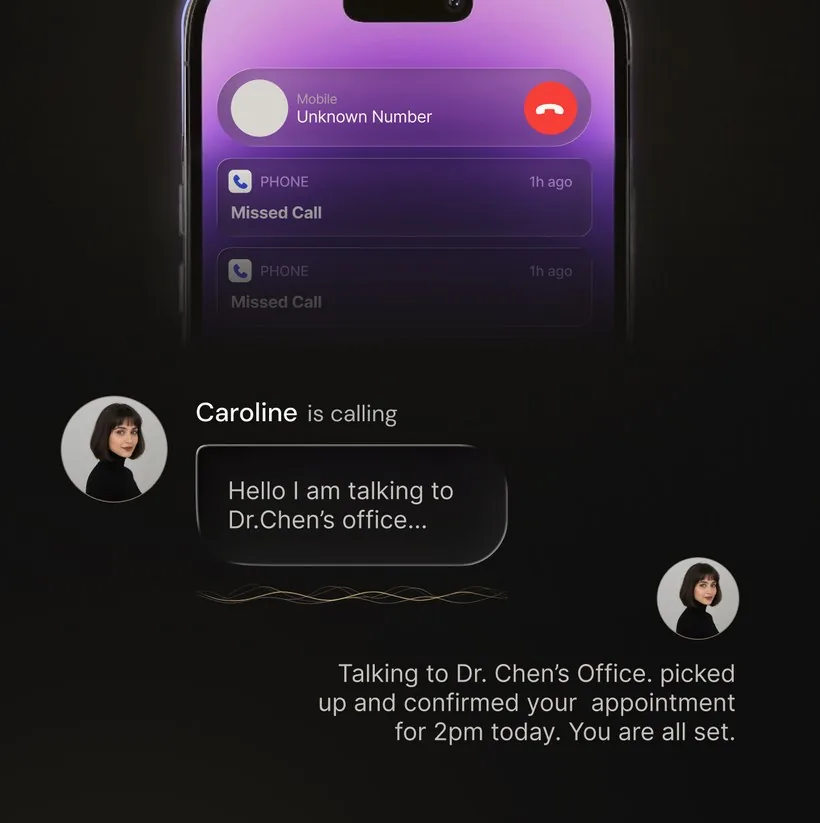
Spam calls are not slowing down. According to industry reports, Android users in the United States received an average of 14 unwanted calls per month in 2025, and that number has only climbed. Robocallers have gotten more sophisticated, spoofing local numbers and using AI-generated voices to sound convincingly human. The built-in call screening on most Android phones still relies on databases of known spam numbers, which means new and spoofed numbers slip through constantly.
If you are serious about reclaiming your phone from junk calls, you need a dedicated spam call blocker. But with dozens of options on the Google Play Store, which ones actually work? We tested and compared the most popular call blocker apps for Android to help you find the right fit. Here are the five best options in 2026, along with what makes each one stand out.
What to Look for in a Spam Call Blocker
Before diving into specific apps, it helps to understand the features that separate a good call blocker from a great one. Here is what matters most:
-
1.
AI-powered call screening. The most effective blockers go beyond static blocklists. AI screening can answer unknown calls, have a real conversation with the caller, and determine their intent before the call ever reaches you. This catches spam from brand-new numbers that no database has seen yet.
-
2.
Large and up-to-date blocklist. A crowdsourced or community-driven database of known spam numbers is still valuable as a first layer of defense. The bigger and more frequently updated the list, the more robocalls get caught automatically.
-
3.
Real-time caller identification. Seeing who is calling before you answer is a simple but powerful feature. Good caller ID pulls from public directories, social profiles, and user-submitted data to put a name on unknown numbers.
-
4.
Privacy-first approach. Some popular call blockers collect and share your contact list, call history, or personal data to build their databases. Look for apps that are transparent about what data they collect and give you control over it.
-
5.
Ease of setup and use. A call blocker that requires complicated configuration or constant manual updates is one you will eventually stop using. The best apps work in the background with minimal effort after initial setup.
With those criteria in mind, here are the five best spam call blockers for Android, ranked by overall effectiveness and value.
1. OsmO AI — Best for AI-Powered Call Screening
OsmO takes a fundamentally different approach to spam blocking. Instead of silently rejecting calls based on a database, OsmO assigns you a personal AI agent that actually answers your unanswered calls and has a natural conversation with the caller. The agent asks who they are, why they are calling, and what they need. It then sends you a real-time summary with a transcript and recording so you can decide whether to call back.
This proactive screening model solves the biggest problem with traditional call blockers: false positives. When a delivery driver, doctor's office, or job recruiter calls from an unknown number, OsmO's agent handles the conversation and gives you the context you need. You never miss an important call, and spam callers waste their time talking to an AI instead of you.
Beyond screening, OsmO can also make outbound AI calls on your behalf, such as calling a restaurant to make a reservation or following up with a business. The built-in AI chat assistant helps you manage your call activity and contacts from a single interface.
Key highlights:
- AI agent answers and screens unknown calls with natural conversation
- Real-time summaries, full transcripts, and call recordings
- Outbound AI calls (make calls through your AI agent)
- AI chat assistant for call management
- Works with any carrier via standard call forwarding
- No ads, no data selling
Price: Free to download. Android offers Basic and Premium; Google Play shows the current localized prices before purchase.
Download OsmO AI on Google Play | Download on App Store
2. Google Phone (Built-in) — Best Free Option for Pixel Users
If you own a Google Pixel phone, you already have a solid spam blocker built right in. The Google Phone app offers caller ID, automatic spam detection, and a Call Screen feature that uses Google Assistant to answer calls and ask the caller to state their purpose. You can watch the transcription in real time and decide whether to pick up.
The biggest advantage is that it is completely free and deeply integrated into the Android operating system. There is no separate app to install or subscription to manage. Google's spam database is also one of the largest available, drawing from billions of data points across Search, Maps, and user reports.
The downside is availability. Call Screen is limited to Pixel devices and a handful of select Android phones. If you use a Samsung, OnePlus, or another manufacturer's device, you will not have access to the full screening features. The screening also uses a more scripted, robotic interaction compared to AI-native solutions, which means some callers may hang up before completing the screening process.
Key highlights:
- Free with no subscription
- Google Assistant-powered Call Screen (Pixel devices)
- Automatic spam detection and filtering
- Real-time transcription during screening
- Deep Android OS integration
Price: Free. Limited to Pixel and select Android devices.
3. Truecaller — Best for Caller ID and Community Database
Truecaller is one of the most widely used call identification apps in the world, with over 400 million active users. Its core strength is its massive community-powered database. When someone reports a number as spam, that information is shared across the entire Truecaller network, making it highly effective at identifying known spam callers.
The caller ID feature is excellent. Truecaller can identify incoming calls from numbers not in your contacts, showing you the likely name and business associated with the number. The app also includes a built-in SMS filter to block spam text messages, and a dialer replacement that integrates smoothly with Android.
However, Truecaller has faced ongoing criticism about its data practices. The app uploads your contact list to its servers by default to power its community database. While you can opt out, many users are not aware of the extent of data collection. The free version also includes ads, and the premium tier ($3.49/month) removes ads and adds some additional features like seeing who viewed your profile.
As a reactive blocker, Truecaller works well against known spam numbers but cannot screen calls from new or spoofed numbers the way an AI agent can. If a robocaller uses a fresh number, it may ring through until enough users report it.
Key highlights:
- Massive community-sourced spam database (400M+ users)
- Strong caller ID for unknown numbers
- SMS spam filtering included
- Dialer replacement with smart search
Price: Free with ads. Premium at $3.49/month removes ads and adds extra features.
4. Hiya — Best for Lightweight Caller ID
Hiya is a clean, straightforward call identification and spam detection app. It powers the built-in spam protection on Samsung and several other Android manufacturers, so there is a good chance you have already used its technology without knowing it. The standalone app adds more granular controls and a larger feature set.
The free version provides basic caller ID and spam warnings. When a suspected spam call comes in, Hiya shows a warning label so you can decide whether to answer. The interface is minimal and easy to use, which makes it a good choice for anyone who wants simple protection without a lot of configuration.
The premium tier ($4.99/month) unlocks automatic call blocking, a reverse phone lookup tool, and an ad-free experience. Without premium, Hiya is more of an information tool than a true blocker, since it warns you about spam but does not automatically prevent the call from ringing through.
Key highlights:
- Clean, lightweight interface
- Powers built-in spam protection on Samsung phones
- Caller ID and spam risk warnings
- Reverse phone number lookup (premium)
Price: Free with basic features. Premium at $4.99/month for auto-blocking and lookup.
5. RoboKiller — Best for Wasting Spammers' Time
RoboKiller takes a more aggressive and entertaining approach to spam calls. Its signature feature is Answer Bots, which are pre-recorded audio clips that pick up spam calls and keep the robocaller on the line. The idea is that while the spammer is talking to a bot playing a confused old man or an enthusiastic contest winner, they are not calling someone else.
Beyond the entertainment factor, RoboKiller uses audio fingerprinting and machine learning to identify and block spam calls. It maintains its own database of known spam numbers and can block calls before they ring through. The app also includes SMS spam blocking and a predictive blocking algorithm that catches robocall campaigns early.
The main drawback is that RoboKiller is subscription-only at $4.99/month with no free tier beyond a short trial. The Answer Bots, while fun, are pre-recorded scripts rather than dynamic AI conversations, which means they do not adapt to what the caller is saying. Some users also report occasional false positives with legitimate calls being blocked.
Key highlights:
- Answer Bots that waste spammers' time
- Audio fingerprinting for spam detection
- Predictive blocking for new robocall campaigns
- SMS spam filtering included
Price: $4.99/month. No free tier; short trial available.
How to Choose the Right Call Blocker
The right call blocker depends on what matters most to you. Here is a quick summary to help you decide:
| App | Approach | Price | Best For |
|---|---|---|---|
| OsmO AI | AI agent screens calls | Store-localized Basic / Premium | Comprehensive AI screening |
| Google Phone | Assistant-based screening | Free | Pixel owners |
| Truecaller | Database + caller ID | Free / $3.49/mo | Caller identification |
| Hiya | Caller ID + warnings | Free / $4.99/mo | Simple, lightweight protection |
| RoboKiller | Answer Bots + blocking | $4.99/mo | Wasting spammers' time |
If you just want basic spam warnings and own a Pixel, Google Phone is the obvious free choice. If caller ID is your top priority and you do not mind the data-sharing trade-off, Truecaller has the largest database. For a simple, lightweight option, Hiya does the job without much fuss.
But if you want more proactive protection, an AI-powered approach like OsmO can screen unknown calls before you decide whether to answer. This is especially valuable for anyone who receives calls from unfamiliar numbers regularly, whether for work, business, or personal reasons.
Frequently Asked Questions
What is the best call blocker app for Android?
The best Android call blocker depends on what you need. For caller ID, Truecaller and Hiya lead; for built-in blocking, Google Phone covers Pixel users. For calls you'd otherwise miss, OsmO answers unknown numbers in an AI voice, screens spam, and texts you a transcript — so real callers still get through.
Is there a free spam call blocker for Android?
Yes. Google Phone is free and built into Pixel and select Android devices, and both Truecaller and Hiya offer free tiers with caller ID and spam warnings. Apps such as OsmO and RoboKiller add deeper screening and blocking through paid tiers. Any current trial or introductory offer is shown in the relevant store before purchase.
Can call blockers stop spam from new or spoofed numbers?
Database-driven blockers struggle here, because they can only flag numbers that have already been reported, so a fresh spoofed number rings through until enough users report it. AI screening closes that gap by answering the call and judging the caller's intent in real time, rather than relying on the number alone.
The Bottom Line
Spam calls are a problem that keeps evolving, and the best defense evolves with it. Traditional blocklists and caller ID are helpful first steps, but they are fundamentally reactive. They can only stop numbers that have already been identified as spam. AI call screening closes that gap by handling every unknown call intelligently, in real time.
Whichever app you choose, using any call blocker is better than using none. But if you want to stop missing important calls while reducing spam interruptions, OsmO AI is free to download; Google Play shows any available introductory offer before purchase.