
AI Call Assistant: Screen Calls, Block Spam & Make Calls Automatically
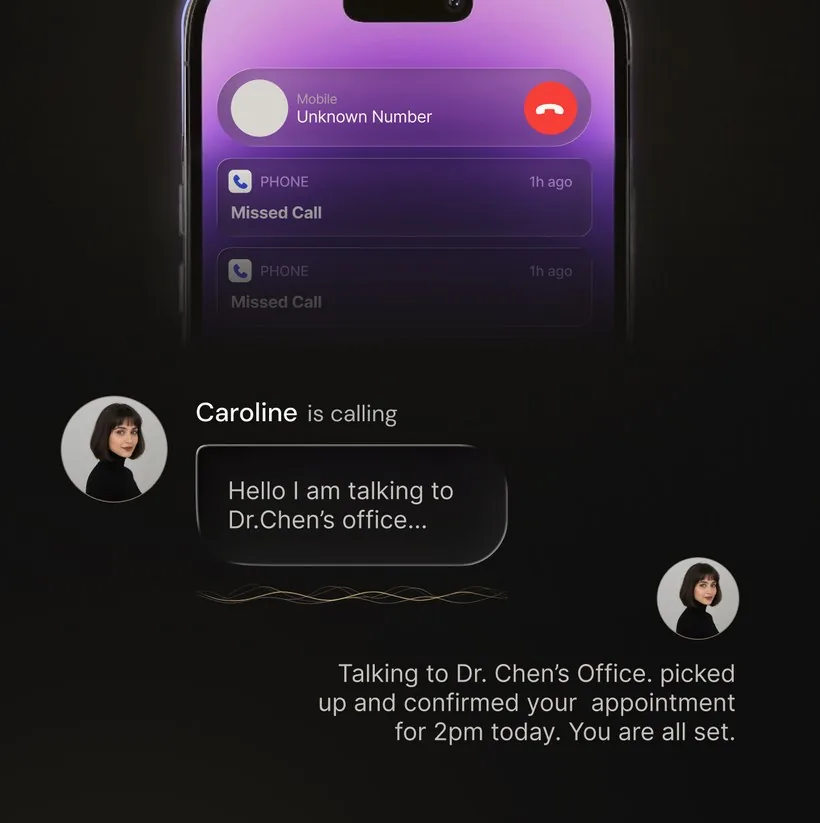
An AI call assistant is software that uses artificial intelligence to handle phone calls on your behalf. It can screen unknown callers by asking who they are and why they are calling, identify and drop spam and robocalls in real time, answer calls when you cannot pick up, and — depending on the product — place outbound calls to businesses and report back.
Unlike a call blocker that silences unknown numbers based on a spam database, an AI call assistant engages with the caller in conversation. It understands speech, asks follow-up questions, and makes decisions based on what the caller says. The technology relies on the same large language models that power modern chatbots, adapted for real-time voice interaction over phone lines. Most AI call assistants work with your existing phone number through conditional call forwarding, so you do not need a second line or a new device.
What an AI call assistant does
Different AI call assistants cover different jobs. Check which of these capabilities a product actually documents before you install it:
- Screens unknown callers — answers calls from numbers not in your contacts, asks who is calling and why in natural language, and lets you decide whether to pick up.
- Blocks spam and robocalls — identifies spam patterns using caller reputation data and real-time conversational analysis. Some assistants can detect and drop robocalls mid-conversation.
- Answers when you are busy — handles calls during meetings, deep work, or off-hours. Takes messages, answers common questions, and forwards urgent calls based on your rules.
- Makes outbound calls — places calls to businesses for bookings, availability checks, follow-ups, and hold queues, then returns the result in writing. Not every AI call assistant offers this; verify on the product's official page.
- Provides call records — after each assistant-handled call, you receive a transcript, summary, or caller reason depending on the product.
How conversational screening works
When a call comes in, the AI call assistant answers and starts a natural-language conversation. It asks who is calling and why, listens to the response, and shares that information with you — usually as a text notification with the caller's name and reason. You can then decide whether to answer, respond with a text, or let the assistant handle the rest of the call.
Most AI call assistants use conditional call forwarding to intercept calls on your existing number. When you do not answer, the call is forwarded to the assistant, which handles the conversation and reports back. Setup typically takes under a minute, but availability depends on your carrier, plan, country, and device.
For a visual example, watch OsmO place an outbound call in this 30-second demo.
Spam and robocall detection
AI call assistants take two approaches to spam. Some rely on caller-reputation databases — large lists of numbers reported as spam — to label or block known offenders. Others combine reputation data with real-time conversational analysis: the AI listens to what the caller says and how they say it, identifying robocall patterns like pre-recorded messages, rapid auto-dialer connections, or known scam scripts.
OsmO uses both approaches for configured incoming calls. It checks the caller against reputation signals and also analyzes the conversation itself. If the AI determines the call is spam, it drops the call and preserves a transcript of what was said — so you can review it without having listened to the spammer.
AI that makes calls for you
A smaller set of AI call assistants can also place outbound calls. You describe the task — book a restaurant, check store hours, follow up on an order — and the AI places the call, handles the routine conversation, and returns the useful details in writing.
OsmO and a few other products offer this capability on both iPhone and Android. Outbound calling is not universal; check the product's official feature list or app-store description to confirm whether it is included. For a deeper comparison, see the separate AI call assistant app comparison.
Use cases
For individuals
Stop spam calls, screen unknown numbers, and never miss an important call. An AI call assistant gives you back control of your phone without changing your number.
For small business owners
Every missed call can be a lost customer. An AI receptionist ensures calls get answered even when you are on a job site, in a meeting, or after hours. OsmO can handle configured incoming calls and provide a transcript so you can follow up at the right time.
For busy professionals
Deep work requires uninterrupted focus. An AI call assistant screens calls silently — only interrupting for the ones you have told it are important. The rest get a message, a transcript, or a polite dismissal.
What to check before choosing
- Direction: does it handle incoming calls, outbound calls, or both?
- Spam handling: database-driven blocking, conversational detection, or both?
- Compatibility: does it work with your phone, carrier, plan, country, and language?
- Call records: do you get a transcript, summary, recording, or only a live prompt?
- Handoff: can an important caller reach you after screening?
- Controls: can you set rules, exempt specific callers, and customize the assistant's behavior?
- Privacy and consent: what is stored, how can it be deleted, and what notice is required where you live?
- Cost: check the current app-store purchase screen for plan limits, localized pricing, and any available trial.
Frequently asked questions
What is an AI call assistant?
An AI call assistant is software that uses artificial intelligence to handle phone calls on your behalf. It can screen unknown callers, block spam and robocalls, answer calls when you cannot pick up, and — depending on the product — place outbound calls to businesses. Most work with your existing phone number through conditional call forwarding.
How does an AI call assistant screen calls?
When a call comes in, the AI answers and has a natural-language conversation with the caller. It asks who is calling and why, then shares that information with you. You decide whether to answer, respond with a text, or let the AI handle it.
Can an AI call assistant make outbound calls?
Some can. OsmO can call businesses for routine tasks such as bookings, availability checks, follow-ups, and hold queues, then return the result in writing. Check the product's official page — not every AI call assistant offers outbound calling.
Does an AI call assistant work with my existing phone number?
Most AI call assistants, including OsmO, use conditional call forwarding to handle calls on your existing number. Availability and setup vary by carrier, plan, country, and device. Check your carrier's call-forwarding support before relying on the feature.
What is the difference between an AI call assistant and a spam blocker?
A spam blocker silences or labels suspected spam numbers based on a database. An AI call assistant engages with the caller in conversation — asking who is calling and why, making decisions based on the response, and taking messages or transferring important calls. Some AI call assistants also include spam-detection capabilities.
Try an AI call assistant on your phone
OsmO can screen incoming calls, block spam, and place outbound calls on iPhone and Android. Free to download; paid plans and any available trial are shown in the relevant store purchase screen.
Related reading: AI phone assistant guide · Best AI call assistant apps · AI receptionist app · How AI call screening works · RoboKiller alternative · Hiya alternative · Truecaller alternative · Stop spam calls on iPhone