
Hiya vs Truecaller vs RoboKiller: Which One in 2026?
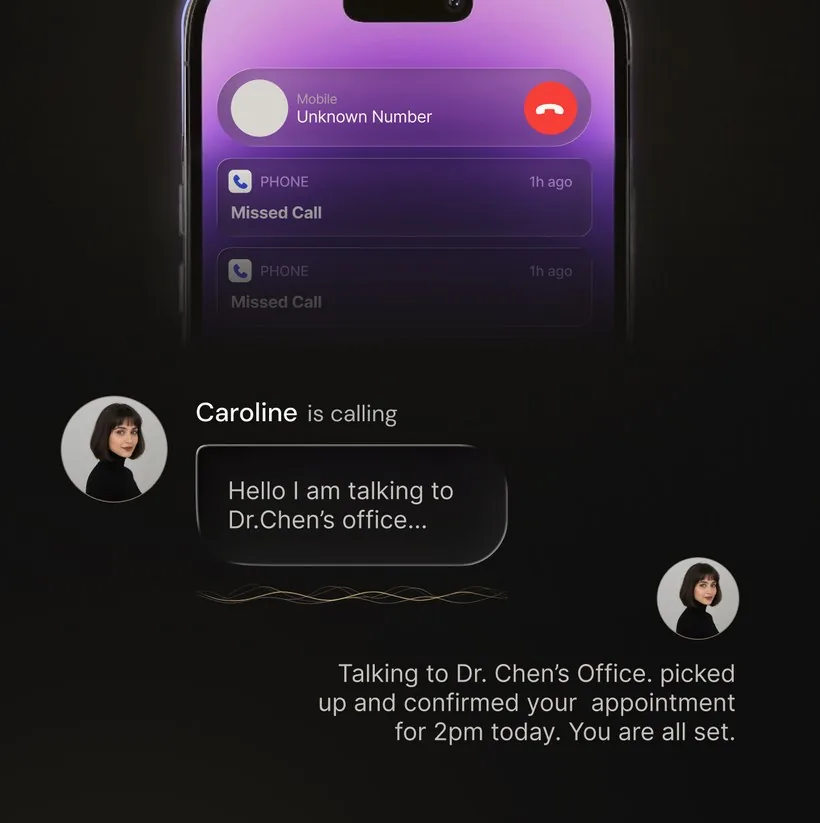
The short version. Hiya, Truecaller and RoboKiller are all deciding something before you answer: who is this, and should the phone ring at all. Truecaller is the lookup — it is the one that tells you the name behind an unknown number. RoboKiller is the bouncer — a large spam database, predictive blocking, spam texts and Answer Bots. Hiya sits between them: caller ID with reputation-led blocking, and a Premium screener. OsmO is on the other side of the line entirely: it answers the call, asks who is calling and why, and sends you the transcript.
Below: what each one actually does, side by side, then a plain verdict for each matchup. This is also our Hiya alternative page, so the last section is the "which do I install" list.
Key takeaways
- Truecaller is the lookup: it puts a name on an unknown number.
- RoboKiller is the bouncer: a large spam database, predictive blocking, spam texts and Answer Bots.
- Hiya sits between them: caller ID with reputation-led blocking, and a Premium screener.
- OsmO answers the call, asks who is calling and why, and sends you the transcript.
Hiya vs Truecaller vs RoboKiller, side by side
Four apps, one row per thing people actually ask about. Where a company does not document a feature on its own consumer help pages, this table says so rather than guessing.
| What you want | Hiya | Truecaller | RoboKiller | OsmO |
|---|---|---|---|---|
| The main job | Caller ID and reputation-led blocking | Caller ID and reverse number lookup | Spam call and text blocking | Answering and handling the call for you |
| Names an unknown number | Yes, from number-reputation data | Yes — this is its core feature | Identifies known spam callers | No directory of its own; it asks the caller instead |
| Blocks known spam | Yes; Android needs Hiya set as the default phone app | Yes, on supported platforms and plans | Yes, plus predictive blocking and audio fingerprinting | Not the approach — obvious spam is dropped during the conversation |
| Actually answers the call | Premium Call Screener asks the caller's name and reason | Truecaller Assistant answers on supported plans, devices and countries | Call Screening on Premium+, and Answer Bots for spam callers | Yes, for calls you send to your assistant — the default behaviour |
| Calls out for you | Not listed in the consumer help pages reviewed | Truecaller states Assistant does not place outbound calls | Not listed in the consumer help pages reviewed | Yes — it can place calls you ask it to make |
| What you get afterwards | The screening answer plus app call history | The Assistant's screening summary, plan dependent | The screening result; Answer Bot calls can be played back on supported plans | A recording and transcript of assistant-handled calls |
| Phones | iPhone and Android | iPhone and Android | iPhone and Android | iPhone and Android |
| Where it works | Availability varies by country, carrier and platform — check each company's current help pages for yours | United States, United Kingdom, Australia, India and Canada | ||
| What it costs | Free tier plus Premium; screening is on the paid tier | Free tier plus Premium; Assistant needs a supported paid plan | Free tier for identification and lists; screening and Answer Bots are paid | Free download with a 7-day trial; some features require Premium |
App store ratings
| App | App Store rating | Google Play rating | Last app update |
|---|---|---|---|
 OsmO OsmO | 4.2 ★ (13 ratings) | 4.2 ★ (130 reviews) | Oct 29, 2026 |
 Hiya Hiya | 4.5 ★ (238,218 ratings) | 3.8 ★ (263K reviews) | Oct 26, 2026 |
 Truecaller Truecaller | 4.4 ★ (252,810 ratings) | 4.4 ★ (29.9M reviews) | Oct 30, 2026 |
 RoboKiller RoboKiller | 4.5 ★ (414,531 ratings) | 3.8 ★ (126K reviews) | Oct 29, 2026 |
Store data last changed October 31, 2026 (US App Store and Google Play). A rating on a few hundred reviews moves faster than one on millions; an app that ships updates often is usually still being worked on.
Competitor facts checked August 2026 against each company's own help centre and store listings; sources are linked at the bottom. Features, plans and country availability change — confirm before you pay. No service identifies or blocks every unwanted call.
Hiya vs Truecaller
Same category, different centre of gravity. Truecaller is the lookup. Its directory is the reason people install it — you get a name on an unknown number, and you can search a number after the fact. Truecaller Assistant goes further and answers incoming calls, but only on supported plans, devices and countries, and Truecaller says it does not make outbound calls.
Hiya is the quieter one. It leans on number reputation to warn or block, and on Android it wants to be your default phone app so it can do that at the point the call arrives. Its Premium Call Screener asks an unknown caller for a name and reason before your phone rings.
Pick Truecaller if identifying and looking up numbers is the thing you want. Pick Hiya if you would rather fewer spam calls got through in the first place and you are not looking for a social directory attached to your number. Both keep screening on the paid tier, so compare those plans, not the free ones.
Hiya and Truecaller both keep screening on the paid tier, so compare those plans, not the free ones.
Hiya vs RoboKiller
RoboKiller is the aggressive one. A large spam-number database, predictive blocking, audio fingerprinting, spam-text protection, and Answer Bots that pick up and keep a spam caller talking. If your problem is a phone that rings all day with robocalls and a message app full of spam texts, that is what RoboKiller is built for.
Hiya is identification first. It tells you who is calling and blocks what its reputation data says is bad, with Call Screener available on Premium. Lighter touch, less to configure.
Pick RoboKiller for volume — robocalls and spam texts. Pick Hiya if caller ID with blocking attached covers it and you want the phone app to stay simple.
Where OsmO fits — it answers instead of blocking
All three of the apps above make their decision before the call is answered. That works well against known spam and badly against the unknown number that turns out to be the courier, the clinic or a job callback — those get blocked, silenced or sent to voicemail along with everything else.
All three of the apps above make their decision before the call is answered.
OsmO takes the other side. The call goes to your assistant, it answers, asks who is calling and what they want, deals with it, and you get a transcript. Obvious spam is dropped in the conversation; a real caller gets handled instead of hung up on. It can also place calls for you — booking, chasing, asking the question you have been avoiding.
What OsmO is not: a caller-ID database. It does not tell you a stranger's name before you answer, because it does not run a directory. If that is the feature you are shopping for, one of the three above is the right buy — and there is nothing stopping you running a caller-ID app alongside an assistant that answers.
What Hiya does
Hiya identifies callers using phone-number reputation data and can warn about or block unwanted calls. Its current help center also documents a Premium Call Screener that asks unknown callers for their name and reason before the phone rings. Setup and availability vary: Android blocking requires Hiya as the default phone app, while iPhone uses Call Blocking & Identification settings and optional call forwarding for screening.
OsmO vs Hiya in detail
If Hiya is the app you are actually deciding against, here it is line by line. OsmO is an AI phone assistant, not a like-for-like caller-ID database — so this is only a fair comparison if call handling or outbound assistance is the job you are hiring for.
| Capability | OsmO | Hiya |
|---|---|---|
| Primary job | Configured call handling and outbound assistance | Caller ID, number reputation, and spam controls |
| Screens unknown callers | For calls you send to your assistant | Premium Call Screener; availability varies |
| Known-number reputation | Not its primary job | Yes |
| Makes outbound calls for you | Yes | Not listed in the consumer help pages reviewed |
| Call record | Transcript after assistant-handled calls | Screening response and app call history; feature-dependent |
| Platforms | iPhone & Android | iPhone & Android |
| Purchase model | Free download; current plans shown in-store | Free and Premium features; current terms shown in-store |
Which Hiya alternative is right for you?
- You want a name on an unknown number: Truecaller, or Hiya.
- Robocalls and spam texts are the problem: RoboKiller.
- Caller ID with blocking, kept simple: Hiya.
- You want the call answered and handled, and calls made for you: OsmO.
- You do not want another app: start with your phone's built-in unknown-caller controls from Apple or Google.
Check device, country, carrier, permissions, privacy controls, and current purchase terms. No service identifies or blocks every unwanted call.
Frequently asked questions
Hiya vs Truecaller: which is better?
Truecaller if looking a number up matters to you — the directory and reverse search are the reason it exists, and Truecaller Assistant can answer calls on supported plans, devices and countries. Hiya if you would rather fewer spam calls reached the phone at all. Both put screening on the paid tier, so compare those plans.
Hiya vs RoboKiller: which is better?
RoboKiller for volume — a large spam-number list, predictive blocking, spam texts and Answer Bots. Hiya for lighter caller ID with blocking attached. Neither answers a real call on your behalf unless you are on the tier that includes screening.
Does Hiya offer call screening?
Yes. Hiya documents Call Screener as a Premium feature that asks unknown callers for their name and reason. Availability and setup vary by platform, version, country, and carrier.
How is OsmO different from Hiya?
Hiya focuses on caller identification, number reputation, spam controls, and Premium screening. OsmO handles calls you send to your assistant and can also place outbound calls for user-requested tasks.
Which Hiya alternative should I choose?
Choose by the job: caller identification, known-spam blocking, incoming screening, or outbound phone tasks. Then verify current compatibility and plan terms.
Can I run a caller-ID app and OsmO together?
They do different jobs, so a lot of people do. Caller ID tells you who is on the line; OsmO answers the ones you would otherwise ignore. Check how each app wants to be set up on your phone — on Android, a spam blocker usually asks to be the default phone app.
Try the one that answers your calls
The other three decide whether your phone should ring. OsmO picks up, finds out what the caller wants, and tells you.
Official sources checked
Competitor facts checked August 2026 against each company's own pages. Features, plans and availability can change — confirm the current terms before you buy.
- Hiya: iPhone setup and Call Screener, Android setup, and spam-blocking limits.
- Truecaller: what Truecaller Assistant is, including that it answers incoming calls and does not place outbound calls.
- RoboKiller: Answer Bots.
- Apple: unknown-caller controls.
- Google: Call Screen support.
Related reading: Best AI call assistant apps · Truecaller alternative · RoboKiller alternative · Whoscall alternative